Built for Players
Loads ready to play on first launch. Remembers your setup automatically between sessions. A built-in safety limiter keeps loud peaks from hurting your ears or your speakers. Input level meter. PHONES mode for headphone listening.

NAM Pedalboard runs your guitar through a full chain of studio-quality effects — compressor, drive pedals, four-band EQ, chorus, delay, tremolo, and reverb — all built around Neural Amp Modeler. Six factory sounds. Eight of your own.
Requires macOS 13 or later.
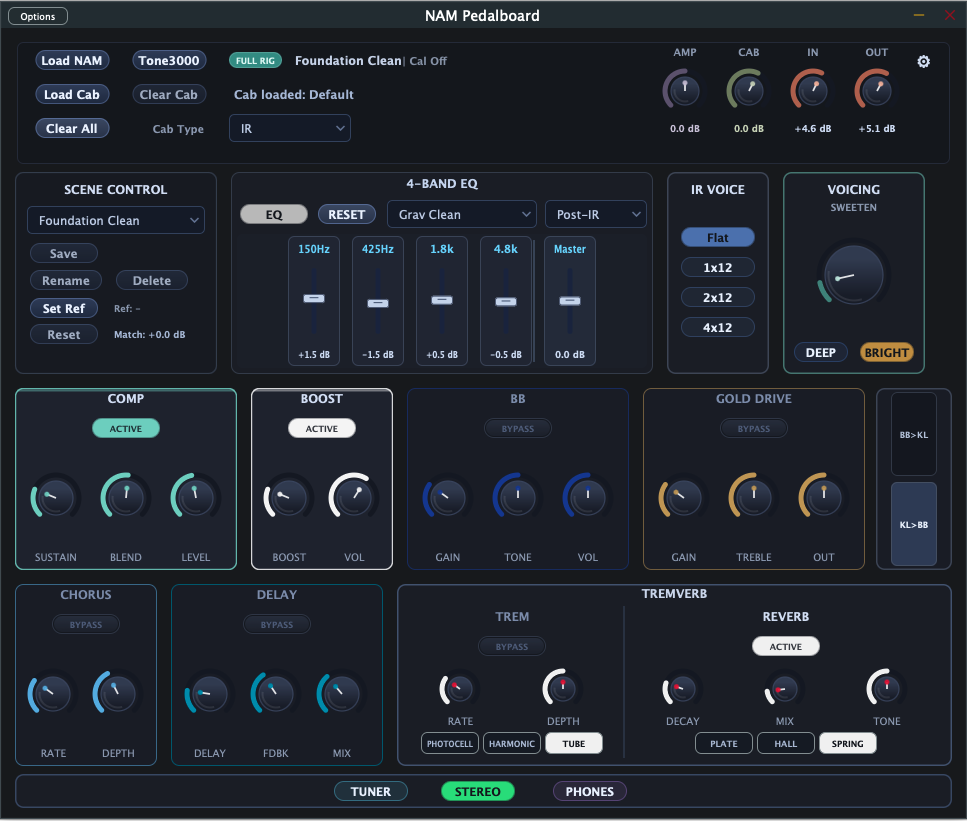
A complete signal chain from guitar in to audio out — no plugins, no DAW required.
Loads ready to play on first launch. Remembers your setup automatically between sessions. A built-in safety limiter keeps loud peaks from hurting your ears or your speakers. Input level meter. PHONES mode for headphone listening.
Load any .nam model to get the authentic character of real amplifiers and gear. The app automatically evens out the volume when you switch between different models, and an AMP trim knob lets you fine-tune the level yourself.
Browse and download NAM amp models from Tone3000 without leaving the app. Search by amp type, pick from featured tones, and load straight into your signal chain. Works with both the original models and the newer, more dynamic A2 captures.
Katana Boost, BB, and Gold Drive — stack up to three overdrive circuits before your amp model. Switch the chain order with the Drive Order control for two classic stacking flavours.
Four bands tuned for guitar: lows, low-mids, high-mids, and highs — plus a master level and six named presets. Place the EQ before the amp to shape what hits it, or after the cab as a final polish.
Add a speaker cabinet sound to your amp using either a classic IR file or a NAM cab capture. Load your own, or use the built-in default cab when you don't have one handy. A CAB trim knob keeps the volume balanced.
Warm stereo Chorus. A classic, analog-style Delay. Tremolo with three flavors — Tube, Photocell, and Harmonic. And a lush, spacious Reverb with Spring, Plate, and Hall options.
Six factory scenes — Foundation Clean, Secret Slap Clean, BB Edge Rhythm, Funk Swirl, Continuum, Lead Push. Save up to eight of your own named scenes. A loudness-matching tool keeps scene levels consistent as you switch.
A final polish stage that adds stereo width, low-end warmth, and a simple bright-or-dark tilt. Three modes — Off, EQ + Warmth, and Full WOW — and three character voices: Sweeten, Amp Room, and Double Track. Saved with each scene.
A fast, accurate tuner that shows the note you're playing and how far sharp or flat you are. Mutes your sound while it's open so you can tune silently mid-set.
AmpSwitch mutes and unmutes any audio app on your Mac — stomp-style. Compare two rigs live, switch between channels with a keystroke, no menu diving while you play.
Requires macOS 14 Sonoma or later.
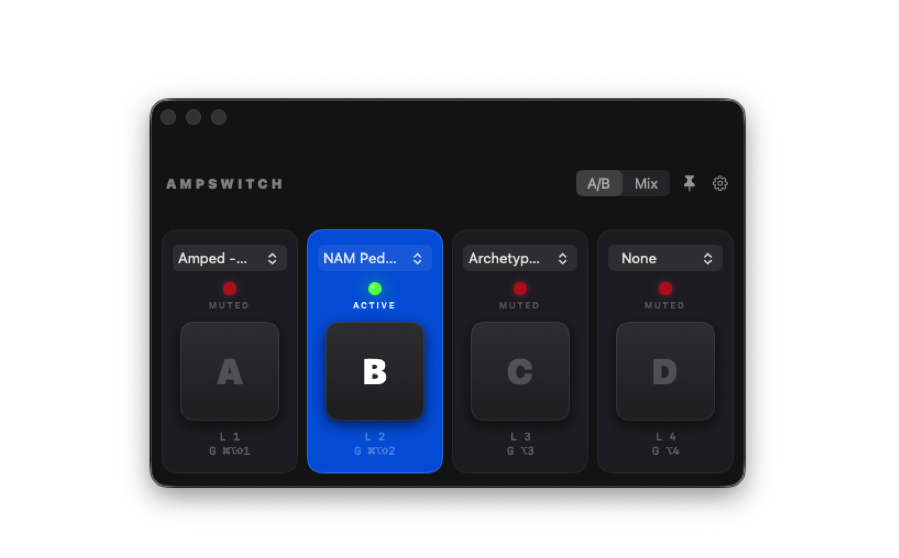
Assign up to four running audio apps to channels A–D and switch between them at the system audio level.
Solo-compare tones instantly using stomp buttons or hotkeys while you play.
Toggle channels independently to hear multiple apps at once.
Local hotkeys switch channels while AmpSwitch is focused — no mouse required.
Keep AmpSwitch visible while using other audio apps and plugin standalones.